How Is the Internet Filtered – Why Can’t I Visit that Site?
There are many nations who are rather keen on filtering the internet. Of course the examples they usually use are of sites run by pedophiles and criminals, which of course nobody objects to. However it rarely stops there, and once some sort of filtering system is adopted in a country you’ll find that list of sites that are blocked gets longer and more varied. Pretty soon there will be all sorts of extensive censorship being practiced – your Government will decide what you can and can’t do online.
But there’s another issue – the technical side is far from clear cut. There is no definitive best method for filtering on this scale. Here’s a couple of the methods some countries have implemented. Both of the techniques depend on the development of a blacklist (sites that needs to be blocked). So consider – somewhere there’s a little group of people who hold meetings deciding on what should be included in this list. Imagine if these people had strong religious or political beliefs – their decisions could be quite different from your own.
But to utilise this black list you have to find a way of stopping people visiting the sites on the list.
One of the most basic methods is DNS poisoning, an extremely simple method of modifying the domain name tables belonging to the ISP’s.
Using this method you can redirect requests for specific blocked pages to someplace else. So when a user asks for one of these pages his browser is actually misdirected to another server – either with a warning page or simply completely blank.
Surprisingly many of the Scandinavian countries like Norway and Sweden have used this method in the past, although it is also been utilised in Holland and Germany too. It’s an awful way of filtering as it messes around with the core functionality of the internet – DNS. But it’s biggest problem is it’s extremely easy to bypass, point your machine at any non-poisoned DNS server and you will get the right address and be able to access the website. The other obvious issue is that you have to block an entire website as the IP address is not related to a single page. Not easy with many social sites and collaborative platforms like Blogger and WordPress. For example is you want to block a single offensive YouTube video you’d end up blocking most of the site if you use this method.
There are more sophisticated methods of filtering the internet though, companies like BT and Optenet specialize in providing such services such as Netclean. All the solutions work in slightly different ways but fundamentally they all have some sort of method of comparing the requested URL with a list of ‘naughty urls’.
The list is obviously one problem as mentioned above – especially in the eyes of those of us who argue against censorship of the internet. But the technologies can also cause issues as well – a current report from Watchdog International highlighted a few technical difficulties that can happen with one of these technologies.
Here is a few of the instances.
ACMA Test of Blocking YouTube
When the Australian Government trialed the BGP filtering system Netclean White Box, they included a few URLs from Youtube to be blocked. The problem was that because a URL from this site was added, all requests for this domain name (Youtube) then got handled directly through the filter. Normally this wouldn’t be an issue with some low traffic criminal website but because YouTube is so popular the box had to deal with millions of requests – which in the end made the Whitebox fall over.
Wikipedia image was contained byIWF List
The Web Watch Foundation manages a very extensive black list of sites over the web. The list can be used by anybody as a master list of which web sites to block. In this event the IWF added the URL of a Picture saved on Wikipedia. Unfortunately this caused a problem with the BT Cleanfeed system being used, when the system filters the web request it acts like a proxy server replacing it’s own IP address with the request. In one of the tests this meant that Wikipedia got hundreds of thousands of request from a single IP address range (the BT Cleanfeed system) which ended up with it being banned and Wikipedia becoming inaccessible for everyone.
The Web Watch Foundation removed the URL pretty rapidly and realised their error but at least the potential problems were highlighted by it when you start any main-stream censorship and Internet Filtering. There is also the very real issue that such censorship can normally be bypassed very easily by simply using a proxy server if needed.
So Can I Watch UK TV in the USA
The trouble with most media websites is they look at your IP before determining what you can see online. More precisely they look at WHERE your IP is authorized to. Some internet sites like search engines use this to tailor your search results, to ensure that you do not end up getting a plumber who lives on the reverse side of the planet when you sort “local plumber” into Google.
So that is great but regrettably that is just about the only advantage. Much more often it is used to prevent access, so if you need to see US TV stations on line from Europe or perhaps British TV whilst in the US then you’ll be out of luck.
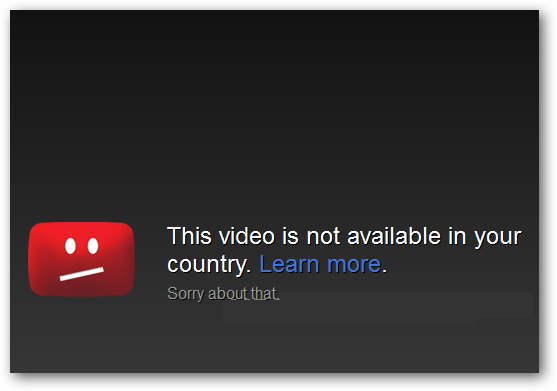
Here’s an example of the kind of display that you’ll get if you do try….
You’ll have the same sort of difficulty if you attempt to access NBC, ABC, Hulu or even Pandora from anyplace outside the USA – because you don’t have a US IP. It gets really annoying, particularly when you travel a lot and discover your self blocked from your favorite web sites simply because you happen to be in another location briefly.
Fortunately it’s possible to sidestep these blocks and actually a complete little miniature industry has developed into allowing completely unfettered use of these web sites.
OK just for illustration, although the same applies to almost every single media site in the world – let’s try and watch the wonderful BBC Iplayer from outside the UK. We’ll just use a security program called Identity Cloaker to access the BBC to demonstrate. The trick is to fool the website into thinking you’re in the UK. This is done by connecting via a different IP address, one based in the UK and hidden by a proxy server.
Here’s what I actually do
That is the small front end of Identity Cloaker which offers you the list of all the proxy servers (about 10 pages of them across a dozen countries). We want a UK one as that will give you a British IP address whcih is essential for UK TV in the USA. In this screen you search down and look for a UK host which has the fastest speed to your relative location. You can also access sites in the United States, Italy, Germany, Canada, Holland and some more places simply by choosing the correct banners.
After selecting this server you will have no problems – simply go to the BBC website and watch whatever you like. You can even disconnect after the programme you wish to watch has started playing (although if you need to change you’ll need to connect to a UK server again).
It’s very easy to use thanks to the point and click interface of Identity Cloaker. It will allow you to see UK TV in almost any country at all, your location simply doesn’t matter. There are loads of providers out there now , but I truly can recommend Identity Cloaker, they have now been around many years, really fast servers and do not charge per proxy like most of the companies.
There’s a really cheap demo for 10 days for a couple of dollars here — Identity Cloaker 10 day trial — try it first to check out how it works for you.
The Risks of Social Media for Activists
There’s no question that social networking websites have demonstrated a main tool for activists who want to expose oppression of the authorities. But this independence comes at a cost, a tremendous danger to these posting, filming or actually showing in such signs.
Even though the advantages of showing this ferocious behavior of their state police is apparent, many individuals don’t think about the dangers involved with both recording and publishing up this kind of proof. There’s a prevalent and fairly naive notion that authoritarian governments and their protection providers take small notice of the dangers set by social media websites like Facebook, Twitter and Myspace – nothing could possibly be farther from the reality.
The thought that persons from places like Iran, Kazakhstan or Syria may function freely on the web without limitations or hazards is just not the case. This type of Online Utopia just doesn’t exist and anybody who posts clues and video reports puts themselves in a tremendous danger. Monitoring individuals from their electronic activities is readily completed with the best assets – and attempting to stay private online is a lot harder than most picture. Of course getting that information online is extremely valuable to any activists – seeing crimes airing on the BBC Iplayer abroad will reach millions of people.
Conceal Your Tracks Online
The truth is that these web sites are seriously supervised also it is very hard to protect your tracks in it. Infiltration of an on-line team or getting the contact list of a recognized capitalist from a social media site gives hundreds to security forces of suspects to follow.
The real pictures or movies also put the individuals portrayed at great danger. Picture you took a movie at an occasion or demonstration to demonstrate the assault of some authorities or security causes. Such events would be brought by it of course to globe observe but on most of the demonstrators engaging information could be also provided by it.
You will find several really sophisticated face recognition systems available to plans who need to identify demonstrators. Plus extremely common for regulators setting up internet sites with pictures reproduced from these photos and movies to be able to recognize activists.
One program that has been developed to be able to try to help offset this danger is called Obscuracam created by a threesome of companies – SEE, The Protector Undertaking, as well as the Worldwide Club Association. Currently on Android it’s a free program which permits customers to censor their pictures and movies before importing.
It allows consumers to unknown the identities of topics easily and quickly from their telephone with no importance of photograph editing software which just may not be accessible while you can observe. It is also utilized to unknown any additional visible details that might be best hidden.
You will find additional characteristics permitting the consumer to establish safe places to eliminate metadata in the picture to add the pictures and.
You may get ObscuraCam from the Android marketplace or from the Protector Project Link above. Ideally it’ll make the courageous activists who endure these repressive, violent plans a small safer.
You should bear in mind though that nearly every government (oppressive or maybe not) has substantial resources tracking these social media web sites. Be cautious what you post up on the web wherever you live.
Looking for a Polish Proxy
In years gone by the internet was pretty open, I rarely remembered ever getting blocked access to a website. But things have changed now and there are lots of filters, blocks applied all over the place. In the last few days I was blocked from accessing Hulu in the USA, my banking site and a funny video clip on YouTube because ‘it was not accessible in my region’.
Fortunately for those of us who get cross about these sorts of things – there are now loads of tools and services which can bypass these blocks which use VPNs and proxy servers. It’s easy to find one if you want standard countries like US and the UK but they can be difficult to find for smaller countries.
For example my friend comes from Krakow but now has settled in the UK. But much of his family are still in Poland and he often finds himself connecting back to Polish websites. Unfortunately increasingly he gets blocked because his location (or IP adddress) is outside Poland. Last week it was a Polish TV site online and a bank based in Krakow that had an online service. It’s exactly the same reason you can’t access Hulu from the UK or some of the cracking shows on Canadian TV that are online.
The technology is called Geotargeting and the easiest way you can see this demonstrated is simply by using Google. So here’s what I get if I go to Google -
Google checks my IP address when I connect, cross references with a database of IP Address/Country and sees I’m in the UK so delivers the British version of Google.
But unfortunately this technology is also used to lock me out of many web sites and applications that are not UK based. SO I can’t watch Simpsons on Hulu, listen to music on Pandora or anything that is restricted to other countries.
Anyway I’ll show how I can change my IP address to a Polish one as a quick example. All I need to do is connect to a Polish server and tunnel my connection through that. This will then fool the web site into thinking that’s my location. There are lots of services which can do this but one I use often is called Overplay
Here’s the software working, I just select the country I need and then press connect. In this case I want to get an IP address from Poland so I select a Polish server from the list. I then just put in the username and password and I’m connected – that’s all there is to it – takes about 10 seconds.
Here’s the connection screen, then you just minimize it to the task bar and carry on as normal. However while this is connected all my requests are being routed through the server in Krakow, and that’s where I’ll appear to be from.
Now you can see that if I visit Google, this time I’ll be given the Polish version because my IP address is listed from Krakow. If I change connections I’ll be given a different version Of course this isn’t particularly useful as I’m not really in Poland. But if I wanted to access a Polish media site or online banking then it would be very useful.
If I changed to a US server I could use all the American sites even on my Ipad, change to Canadian server and watch Canadian TV and so on. They’re well worth checking out as you get all the servers included in the subscription – helpful support too – Overplay Trial.
How to Watch Hulu From Outside the USA
I’m sure you’ve heard of it – as Hulu is one of the most popular TV/Video sites on the planet. It’s full of great American shows and not just the two year old ones – you’ll find the very latest Simpsons, Family Guy, Glee and Americas’s Got Talent. Anyway the problem is that unless you live in the US you won’t be able to watch it at all.
Watching Hulu from Outside the US
Here’s what happens when you try and access the Hulu site – you get the following little message -
It doesn’t matter where you live, if it’s not in the USA then you’ll get this message or similar. Even if you try from Canada you’ll get exactly the same – doesn’t seem fair does it !! The problem is that the website looks up your IP address when you connect and works out where you’re based – anything non-US and you can’t access the site, you need to present a US IP address or you won’t get anywhere.
The solution as many have found is to hide your real IP address and use one that is based in the USA. You have to use a US server to route all your traffic through when accessing Hulu.
You used to be able to use a simple US proxy server for this and there were even a few free ones supported by advertising like Hotspot Shield. However unfortunately those don’t work now as Hulu is able to detect when these proxies are being used.
You need to find a service that provides a more secure connection, or if you work for a company who have a US office ask them if they have a VPN you can use !
Anyway you’ll find there are lots of companies offering proxies and VPN services online – mostly for a very reasonable cost. The one I use is actually a security program which is great for watching media sites as they have lots of servers in different countries and it’s certainly the best value – it’s called Identity Cloaker.
It’s very easy to use – here’s the screen where you select the proxy server to use -
It’s very easy to use – whenever you need to hide your IP address, you fire it up and simply click on the server you need – in this case for Hulu, you need a US based one. Identity Cloaker has servers in the UK, Canada, USA, France, Germany, Italy, Australia and a few others.
If you go back to the Hulu site you’ll go straight in and be able to watch the shows without any problem.
I currently use Identity Cloaker all over the world – for BBC IPlayer and ITV when outside the UK and for the US sites when I’m at home. It’s well recommended, the servers are really fast and you can even run the program from a USB key if you use different computers when travelling – try the 10 Day Trial Here to check it out first.
If you want to see a post on how to use it watch BBC Iplayer – this might help you – BBC Iplayer Abroad 2012